SAM’S CLUB (WALMART MEXICO)
Commercial hierarchy: a single source of truth for approvals
A single module to know who approves prices, promotions and purchase orders, and to manage cover.
- Research
- Workshops
- Information architecture
- Initiative
- A centralised module to manage the commercial hierarchy and define who approves prices, promotions and purchase orders.
- My role
- Product Designer. I led research and experience design.
- Timeline
- February - June 2025.
01.Summary
At Sam’s Club Mexico, Walmart’s wholesale store chain, many commercial decisions need approval from a specific role, such as a special price for a bulk purchase, a promotion with a steep discount or an unusual purchase order. There was no single source for knowing who should approve each case. Each team handled it its own way, and every module on the platform configured its approvers separately.
I led research and design for a centralised module to manage the commercial hierarchy, define who approves each type of request and handle cover during absences. I ran 18 interviews with people from the teams involved, designed the solution and validated the approval and cover flows in 8 usability tests. The design was handed off to engineering and was awaiting implementation.
02.Context and problem
Sam’s Club Mexico’s commercial structure is organised into tribes, large category groups such as Fresh & Perishables or Grocery & Impulse. Each tribe splits into squads with buyers, buying assistants, replenishers, managers and directors. Several operations on the internal platform, such as volume pricing, promotions, purchase orders or merchandise transfers between stores, need one of those roles to sign off before moving forward. The goal is to avoid mistakes that end in poor margins, shrinkage or excess inventory.
Yet the commercial hierarchy, that is, who reports to whom and who can approve each type of request, only existed in an Excel directory updated by hand every month and published on an internal portal. The platform had no single source of truth to draw on. Each module had its own approver setup, disconnected from the rest, with no one responsible for keeping it current.
The 18 research interviews revealed the cost of that fragmentation:
- •Approvals were spread across different tools and email.
- •No one was notified of pending requests. In the pricing tool, the module where price changes are requested and approved, if nobody replied within 24 hours, the request escalated or was auto-rejected.
- •There was no formal cover process. It was handled through Teams out-of-office messages, email, chat or word of mouth.
- •When someone changed roles, the directory lagged behind because it depended on the monthly update.
- •In some modules, the person making a request could approve it themselves.
03.My role and who I worked with
I worked with product, business analysts and developers. My research and design leads mentored the project and reviewed the approach and deliverables, and content design reviewed the language on screen.
I led research end to end. Beyond interviews, I facilitated workshops with team leads to understand how the commercial structure was organised. On that basis I designed the module’s flow and screens and validated them with users. I presented findings to stakeholders and design proposals to engineering to agree scope before moving on.
04.Goals
Centralise the commercial hierarchy in a single source of truth that platform modules can use.
Reduce errors in pricing, promotions and purchase orders caused by missing hierarchical validation.
Improve approval response times and formalise cover management.
Through research, understand who approves what, how approvals escalate and where requests stalled.
05.Decisions and the evidence behind them
I used AI to speed up the discovery analysis, always checking every result against what I had observed in the sessions. During design I also used it to explore screen alternatives.
Knowledge of who approves what was scattered across a spreadsheet, each module’s settings and people’s heads.
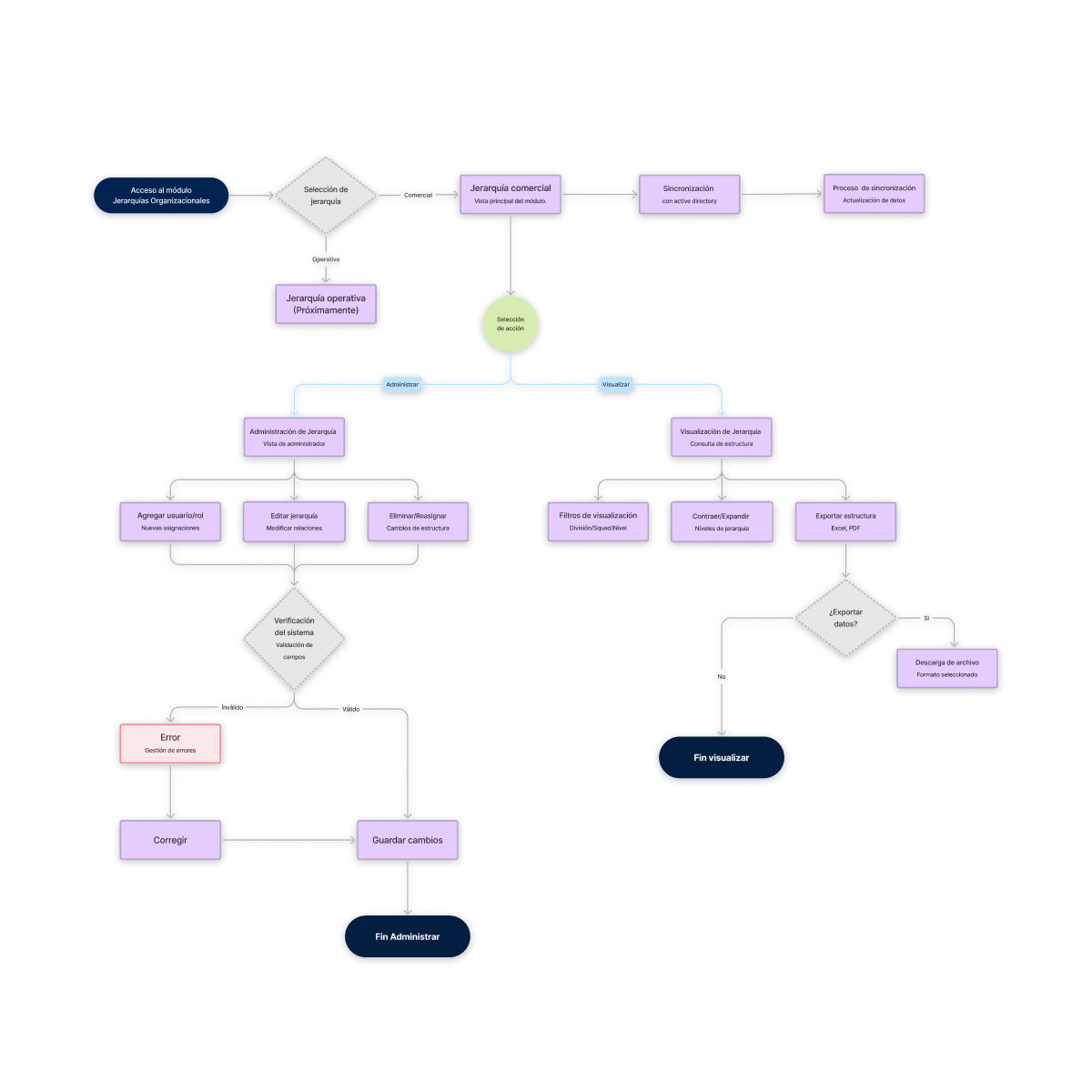
Several interviewees agreed the ideal solution was one place, organised by person rather than by activity. So I brought everything into a single module with four sections: manage the hierarchy, look it up, configure approvals and manage cover.
The first version of the entry point failed. In testing, none of the three users in the approvals flow connected the “Organisational hierarchies” submenu with approval settings. With content design, we renamed it “Hierarchies, approvals and cover” and added a short description of what you can do there.
The lookup view started from the org chart I rebuilt in the workshops. Interviews surfaced confusion about who to send an approval to, made worse by people sharing names, and a request for a directory organised by area and responsibility. The view shows the structure as an org chart per division, with search by person or role, and lets you download it by area to share with other teams.
Managing the hierarchy would fall to one person, the one who updated the Excel directory, with a backup for absences. As a first stage, while integration with HR’s joiners-and-leavers system was being evaluated, I designed an Excel-like editable table, the format she already worked in, on the hypothesis that a familiar format would ease adoption. Each row is edited inline, the system validates fields before saving and the screen shows when it was last updated.
The approval maps showed approvals already followed tiers: depending on the amount or discount percentage, a request goes to a manager, a deputy director or a director. I designed the approval configuration on the same logic, with a table per module with four impact levels (low, medium, high and critical), the criteria for each and the approving role.
In testing, users understood the levels and the logic, and two changes came out of it. We removed the “Forecast by category” column, a technical inventory-planning term two of three users didn’t understand. And response time became a cut-off time, such as “same day by 2:00 p.m.”, which is how people thought about it.
Cover was informal and there was no way to know who was standing in for whom. I designed a flow to assign a stand-in per module and period, with upfront validation that catches conflicts, such as a stand-in who will also be away, someone who has left the company or someone without approval rights in that module. Each case gets a specific message and status colour.
Users completed the flow in testing, with three changes. Three of five asked to be able to edit or cancel a registered cover, for example if they came back earlier than planned. Three didn’t understand the status labels. And three found the “Action on timeout” column unnecessary, since escalating is a given. As a result, edit and cancel options were added, the labels were rewritten and the column was removed.
06.Limitations and constraints
- •The hierarchy was meant to update automatically from the internal system where HR records staff joiners and leavers. That integration’s technical limits were still being assessed, so the design supports manual updates.
- •The management flow was never validated with users. Only two people would use it, and their schedules didn’t allow for sessions.
- •The initiative originally covered both the commercial and the operational hierarchy, which covers the stores. Business priorities narrowed the scope to commercial.
- •Test samples were small, with 3 users for approvals and 5 for cover, due to availability.
07.Impact
The design was handed off to engineering, with the approval and cover flows validated in usability tests and refined from their findings.
The research documented the commercial hierarchy org chart and the approval flows of four modules, which became the foundation for the design.
When my involvement ended, the module was awaiting implementation, so this case documents research and design decisions, not production results.
08.What I learned
Bringing content design in from the start saves rework. None of the three users found approval settings because of the submenu name, and access was solved by working on the copy with content design after testing. With content design involved from the start, that problem would have been caught sooner.
A directory doesn’t explain how an organisation works. The spreadsheet said who was who, but not who approved what or how it escalated. That only emerged in the workshops and approval maps.
What didn’t work: the flow with the highest adoption risk, hierarchy management, was exactly the one left unvalidated. Next time I’d test it earlier or, with tight schedules, use a lighter format like an asynchronous test.