SAM’S CLUB (WALMART MEXICO)
Redesigning the tool for executing and reporting product placement
A look and feel initiative that, after listening to users, ended up transforming the flows.
- Redesign
- Design system
- User flows
- Initiative
- Sam’s Club Mexico’s internal platform for communicating and tracking product placement in its stores.
- My role
- Product Designer. I led the redesign: user flows, visual interface and developer handoff.
- Timeline
- April - August 2024.
01.Summary
Sam’s Club Mexico, Walmart’s wholesale store chain, uses an internal platform to tell each store how to lay out products on its shelves. The Staff team, made up of space-planning specialists, defines those instructions, known as planograms. Staff at each store execute them and report back through the tool, with photos.
The initiative started as a visual redesign to align the platform, in use in the stores since 2021, with Walmart’s design system. Once we analysed the tool, the scope grew to cover flows and content. I led the experience redesign for handheld terminal (TC-70), tablet and desktop, in a team with UX research and content design. The solution was validated in usability tests with 13 users and shipped.
02.Context and problem
Sam’s Club Mexico launched the platform in 2021. When the Staff team creates or updates a planogram, they publish it on the platform with an execution deadline. In the store, the people in charge of restocking and arranging merchandise set it up and report through the tool whether it was executed correctly or something went wrong. Staff reviews those reports and follows up.
Walmart’s international technology team found that the platform didn’t comply with its design system. The brief’s indicators also showed adoption between 65% and 74% during Q1 2024.
During discovery, the UX research team found that interviewees saw the platform as a simple tool.
The friction wasn’t in its ease of use, but in the communication between the store and Staff. For example, finding out something new had been published, reporting a problem, sending enough evidence and getting an answer.
Research also surfaced obstacles outside the tool:
- •Unstable internet in the stores.
- •Tablets weren’t always available, and staff preferred not to use their personal phones for work.
- •Planograms often didn’t match the store’s actual inventory or fixtures.
03.My role and who I worked with
I was part of a three-discipline team: UX research, content design and product design, which I owned.
I redesigned the flows for stores and Staff, and the interface for handheld, tablet and desktop. I ran the design sessions with product and engineering in Mexico and with the international team: presentations, reviews and handoff.
04.Goals
Align the platform with Walmart’s design system.
Improve flows and content, not just the visual layer.
Improve communication between the stores, which execute planograms, and Staff, who define and follow up on them.
Deliver a fitting experience on store devices and on desktop.
05.Decisions and the evidence behind them
The initiative assumed store staff would use their personal phones. Research showed tablets weren’t always available and people preferred not to use their phones for work. Following research’s recommendation, the team chose the TC-70, the handheld terminal already used in the store. I designed the experience for that device and adapted it to tablet and desktop.
One of the central changes was how a report is closed. Before, users had to pick “Executed correctly” even when they had something to flag, and those comments got lost. It was replaced with a direct question: “Were you able to complete the module correctly?” If the answer is no, the user picks a reason from a list, adds a comment and attaches evidence. That way every problem is logged as an incident.
Evidence changed too. Each report allowed a single photo, which couldn’t show execution detail in categories spanning several shelf groups and aisles. Some stores made collages to fit everything in one image, but the photos ended up too small and took time. Research recommended up to 5 photos; the design landed on 3 due to technical constraints.
So incidents wouldn’t sit unanswered for weeks or end up in email, I designed each one as a conversation thread between the store and Staff, with an In review status. Other people at the store, like their lead, can join the thread to speed up the answer.
To find out whether a planogram was new or updated, stores had to log in every week and check by hand, category by category. I added a notification bell with an unread indicator. When opened, it separates new or updated planograms from Staff replies to incidents. An email alert also links straight to the conversation thread.
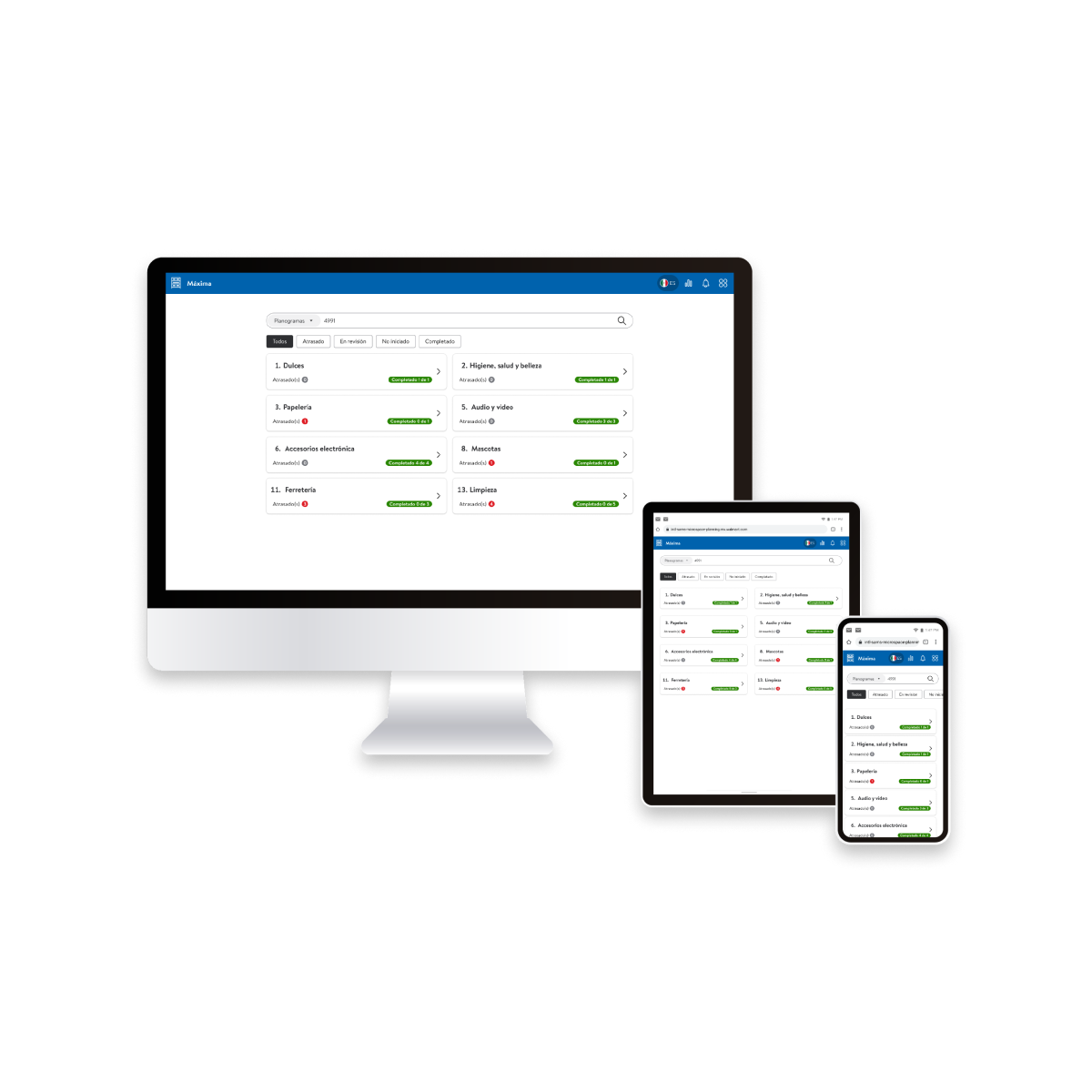
Research also showed both teams needed to see what was overdue in fewer clicks. I designed a home screen showing, per category, how many planograms are past their deadline and overall progress, with status filters.
Each subcategory shows its status and deadline with a colour:
- •Red: overdue.
- •Yellow: in review.
- •Green: complete.
Everything was built from design-system components, keeping the same structure across all three formats. Empty states and confirmations share the same visual language, so users always know where they are in the process, even when nothing is pending.
06.Limitations and constraints
The new flow makes incidents visible and notifies when there’s a reply, but response time still depends on the Staff team.
07.Impact
The redesign shipped on TC-70, tablet and desktop, after validation in usability tests with 13 users.
Post-launch adoption measurement didn’t include the design team, so this case documents design decisions, not results in the stores.
08.What I learned
A visual initiative can hide a flow problem. The project started as a look and feel update, and research showed the friction was in the communication between the store and Staff.
Design wasn’t part of post-launch measurement, so we never learned how the redesign performed in the stores. Today I’d agree from day one what we’ll measure and how we’ll learn the results.
Adoption doesn’t depend on design alone: connectivity and device availability weigh as much as the interface.